Subsetting Fontawesome to save 250KB
Look at the following icons:- Filled icons (solid):
- Outlined icons (regular):
- Brand icons (brands):
Just to load these icons using a CDN like below takes up 252.9kb of data.

This reflects badly on your PageSpeed Score for two reasons:
- Loading that 17.3kb of css is render blocking, which means the website cannot load anything
else why the css is loading. The PageSpeed Score Test below shows that this can take as much
as a second.
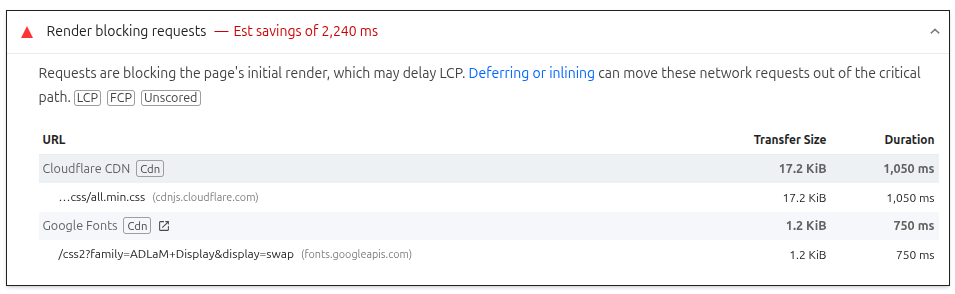
- We're only using a small portion of the 2000+ free fonts that FontAwesome provides. Thus, a large portion of that CSS is unused, as well as the 235.6kb worth of font files.

Below I will show you the various methods I used to solve this problem.
Method #1: FontAwesome Auto Subsetting
FontAwesome offers their products via kits. The idea is you'd have a kit for each of your websites or apps. To embed a kit into your website looks like this:
<script src="https://kit.fontawesome.com/68694a6289.js" crossorigin="anonymous"></script>These kits work by scanning all the icons on your page, and then loading only the styles of icons you use.
At first, that's sounds like exactly what we want. But if I try this on this very blog post you're looking at, you'll notice a problem.

This transfers 280kb, which is more than the CDN CSS file did. And it still loads all the woff2 files for the regular, solid, and brand styles.
This happens because the kit doesn't create dedicated .woff2 crafted with just the icons you need. Rather, it observes the styles you use. At the top of my blog post, you saw me list a bunch of solid, regular, and brands icon.
If I only had use solid icons, the kit would only load "free-fa-solid-900.woff2" and possibly a CSS file. All the other files would not be included.
And while only loading specific styles is better than blindly loading everything, it's still includes a bunch of unused bloat.
Method #2: Custom Subsetting
FontAwesome offers Custom Subsetting under a Pro Plan, which essentially lets you pick the specific icons you want (say, a car, a building, and a piggy bank).
Then their paid tool will generate super lean css and woff2 files that only includes the icons you specified.
This would be perfect for my client, as I could save an entire second (per the figure 1) of loading time and possibly try some advanced techniques to even inline the woff2 file into the css file.
However, I faced a problem. This tool is not automatic, you must manually pick the icons yourself to generate your own dedicated package. I built a custom Decision Tree plugin for my client, and we use icons to help convey the potential responses users can give.
Therefore, I didn't know the icons that could be used upfront. And even if I did, they could change at anytime. So I needed this process to be automatic, but FontAwesome didn't have a CLI tool to generate a subsetted package.
So I built my own tool.
Method #3: My Custom Automatic Subsetting CLI Tool
Before building my own tool, I tried searching online, and found fa-subuset.
It's a python script that takes your pack of icons and then generates a css base file and woff2 files containing just the icons you needed.
You just pass in the locations to your fontawesome css packs, and then a directory where it can go scan the HTML for used icons. I tried this tool and for some reason, it wasn't working with the FontAwesome 6 Kit files I provided.
I have no idea how to debug python, but in a open Issue named "Fixed script for new FA6 formats", someone provided a modified script that claim to work with FontAwesome 6 changes. I tried this new script as well, but now I got a new error telling me "Missing in CSS mapping."
Being developer who have only used bracket languages like C#, Go, and JavaScript, I found the Python code to be frustratingly difficult to follow. To be fair, the script was also quite terse. Ultimately, I was unable to decipher how the script work and what exactly the messages I was receiving meant.
So I thought, "I'll just build it myself, it couldn't be that hard." All icons are loaded like this:
.fa.fa-warning {
    --fa: "071"
}

.fa.fa-calendar {
    --fa: "073"
}

.fa.fa-arrows-v {
    --fa: "338"
}

.fa.fa-arrows-h {
    --fa: "337"
}

.fa.fa-bar-chart,.fa.fa-bar-chart-o {
    --fa: "e0e3"
}
The unicodes you see like "\f071" reference a specific icon in the woff2 file by its index. So to build my own tool, I simply need to:
- Grab the fontawsome all.css file (which contains the unicodes for every icon)
- Prune that CSS file to remove all the unused classes like "fa-address-card"
- Collect the unicode mappings for all the remaining css classes
- Subset the woff2 file to just those unicodes from step #3
- Serve my new CSS and woff2 files
- Grab the fontawsome all.css file
- Prune that CSS file with csspurge
- Collect the unicode mappings for all the remaining css classes (simple regex)
- Subset the woff2 file to just those unicodes from step #3
- Serve my new CSS and woff2 files with github.com/tdewolff/font
I won't go into the weeds of creating this CLI tool, because that's an entire 2-day story of its own. But, in the end, I had a working tool in 190 lines that I could now pass a HTML file and it would create a fontawesome folder with the CSS file and woff2 files I needed.
Here's what using this CLI looked like:
khalil@khalil-computer:~/Desktop/fontawesome_auto_subsetter$ go run . -- tmp/project/index.html
Font Awesome 7 Free Regular:    Using 5 out of 170 glyphs
Font Awesome 7 Free Solid:      Using 7 out of 1423 glyphs
Font Awesome 7 Brands Regular:  Using 5 out of 551 glyphs
Font Awesome v4 Compatibility Regular: Using 1 out of 39 glyphs<link rel="stylesheet" href="/fontawesome/css/all.min.css">
The subset I have contains about 15 icons (which is an average number for a website), and has a CSS file that's only 5.4KB. That's a 68.7% reduction.
But more importantly, each of the woff2 font files are each only around 1.3kb. That's a huge improvement from the original 111kb, 19.7kb, and 115kb files we had.
Even though it wasn't straight forward to get it here, it was worth and was a single step in a long process I took to get my clients PageSpeed Score from the low 60s to the high 90s.
Conclusion
If you're build websites or applications, I hope you invest this same level of care into optimizing them.
Yes, sometimes it will require building custom tools, but it's worth it because of the improved expierence of your users. When every website and app right now feels like molasses, it always feels nice when a site tries to keep things lightweight.
If you have questions or business inquiries, please reach out to me at bookofcooks123@gmail.com or DM me on Reddit.